

New: now on iPhone, iPad and Android too. BranchShell

The SSH client that knows your repositories.

Your servers, keys, port forwards and databases in an encrypted vault on your computer. Split terminals, SFTP with S3 and R2, a SQL client, mosh. And a link to BranchBay that puts every host one shortcut away from the repository it belongs to.

14-day trial on first launch, then $20 once for 2 computers. No account, no cloud, no usage tracking, like BranchBay.

Download BranchShell on the App StoreGet BranchShell on Google Play

On a phone or tablet: free for 14 days, then $14.99 a year in the stores.

  • Native

    Written in Rust and drawn on the GPU, on the same engine as BranchBay. The terminal, the widgets and the themes are the ones you already use.

  • Local-first

    Hosts, keys, identities, snippets, forwarding rules and database connections live in an encrypted vault on your computer. No account, no cloud: the vault stays on the machine.

  • Made for BranchBay

    Link the two once and the tray lists your whole vault: connect to a host, start a forward or open a database from any app, or drop into a shell in the repository you are looking at.

  • Out of the way

    BranchBay starts it in the background when it only needs a forward. No window, no Dock tile, until you open a session yourself.

Features

An SSH client with a vault, not a settings file.

Everything Termius and the others keep in the cloud, BranchShell keeps in an encrypted vault on your computer, with the terminal BranchBay already runs.

The BranchShell Hosts view with a Microserver host selected and its details panel open on the right
01

Every server, with everything it needs.

Hosts in groups with a colour and tags, each knowing its user, port, key or password, the operating system behind it, a terminal theme of its own, the environment to set and the snippet to run on connect. Hop through jump hosts in a chain, or go out through an HTTP or SOCKS proxy. Import your SSH config, or fetch the servers in your AWS, DigitalOcean, Azure and Hetzner Cloud accounts.

  • Groups and tags
  • ProxyJump chains
  • HTTP and SOCKS proxies
  • Run on connect
  • Per-host themes
  • Import ~/.ssh/config
  • Cloud import

And much more...

  • Known hostsAccepted host keys with their fingerprints, importable from your OpenSSH file.
  • Session logsWhen and from where each session ran, with the ones you saved kept.
  • Several vaultsWork and personal in separate encrypted files, one shortcut between them.
  • Auto-lockThe vault locks after an idle time you choose and asks for its password again.
  • Group filterCmd+G narrows hosts, keys, forwards and snippets to the groups you pick.
  • Serial portsOpen a serial console next to your SSH sessions, in the same tabs.
  • Broadcast inputType once and every pane in the workspace gets it.
  • UI scaleCmd+= and Cmd+- scale the whole window, not only the terminal.
  • Light themeA light window theme to go with the light terminal themes.
  • Menu barClose the window and BranchShell keeps its forwards running from the menu bar.
  • Submarine importBring a Submarine vault across with its hosts, keys, forwards and snippets.
  • Keyboard firstIn every list and search box the arrows walk the rows, Return acts and Esc leaves.
Download

Pick your platform and connect to a host.

The 14-day trial starts on first launch. No account needed.

Version 1.1.1 Release notes
Disk imageOpen it and drag BranchShell to Applications. Signed and notarised. Updates itself.
Every file, for every platform
iPhone, iPad and Android

Your servers, in your pocket.

BranchShell for iPhone, iPad and Android is the companion to the desktop app. Scan one QR code and your vaults are on the phone, opened with your face or fingerprint. Or start fresh there, with no computer at all.

Download BranchShell on the App StoreGet BranchShell on Google Play

Free for 14 days, then $14.99 a year in the App Store and Google Play, apart from the desktop licence. No account.

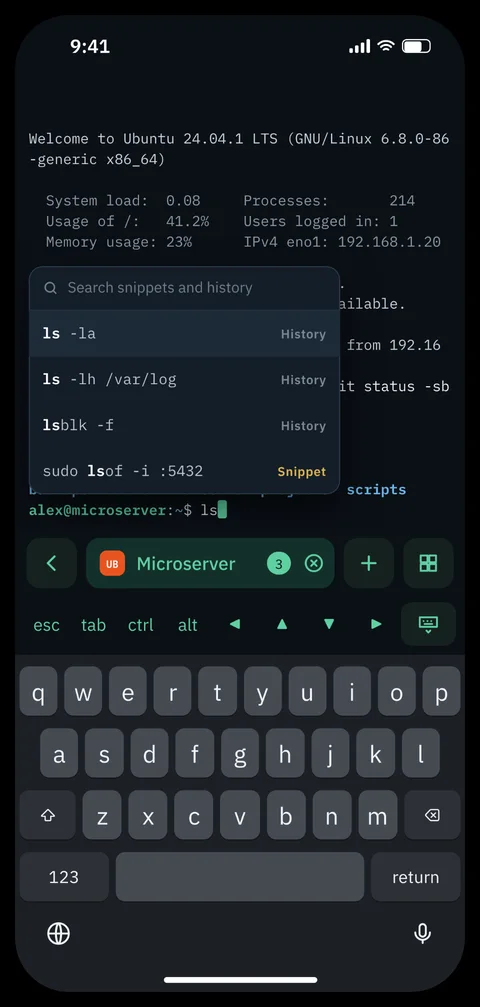
  • An SSH session in BranchShell on an iPhone with autocomplete suggesting commands from history and snippets above the extra keys

    A terminal for your thumbs

    Extra keys for Esc, Tab, Ctrl, Alt and the arrows, and autocomplete from your snippets and history.

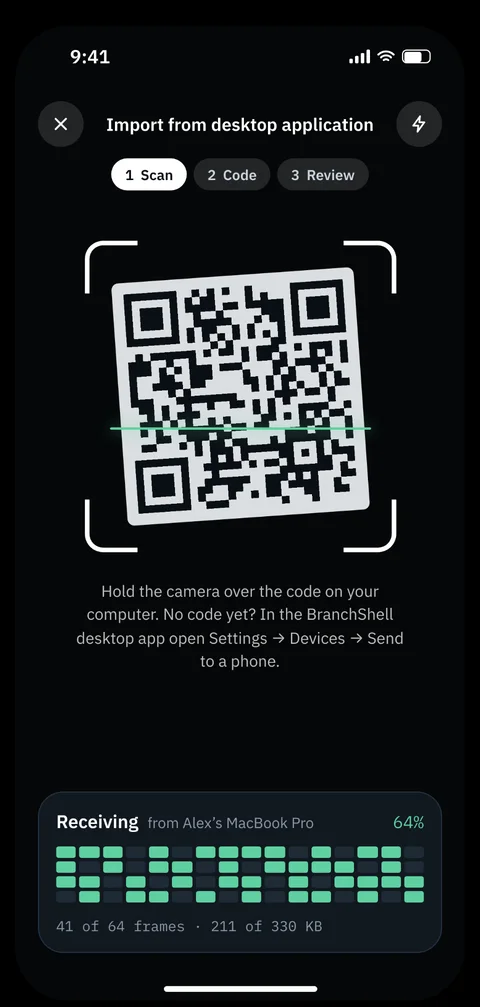
  • BranchShell on an iPhone scanning the QR code the desktop app shows to receive its vaults

    Your vaults, by QR code

    Hosts, keys, snippets and forwards cross from the desktop sealed under a one-time code. No cloud.

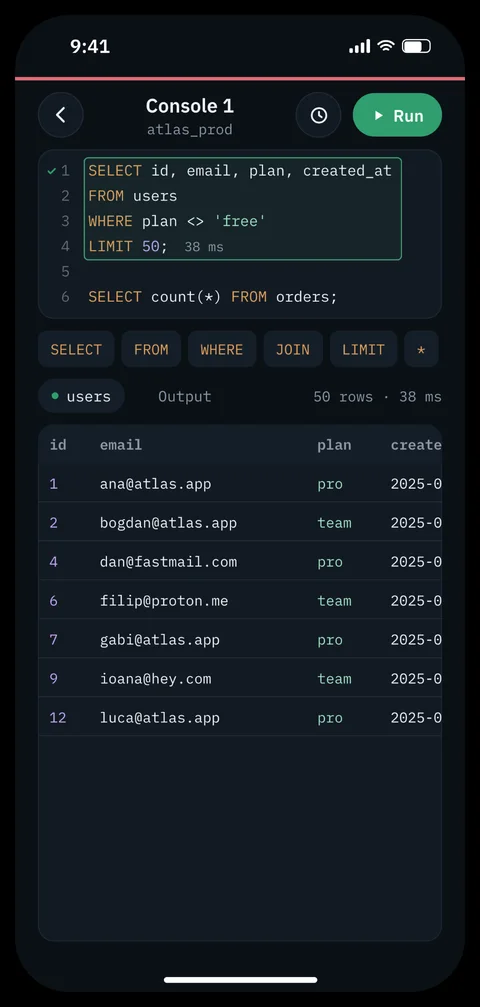
  • A SQL console in BranchShell on an iPhone with a query and its result rows

    Databases too

    PostgreSQL, MySQL and SQLite, direct or through an SSH host, with a table browser and a console.

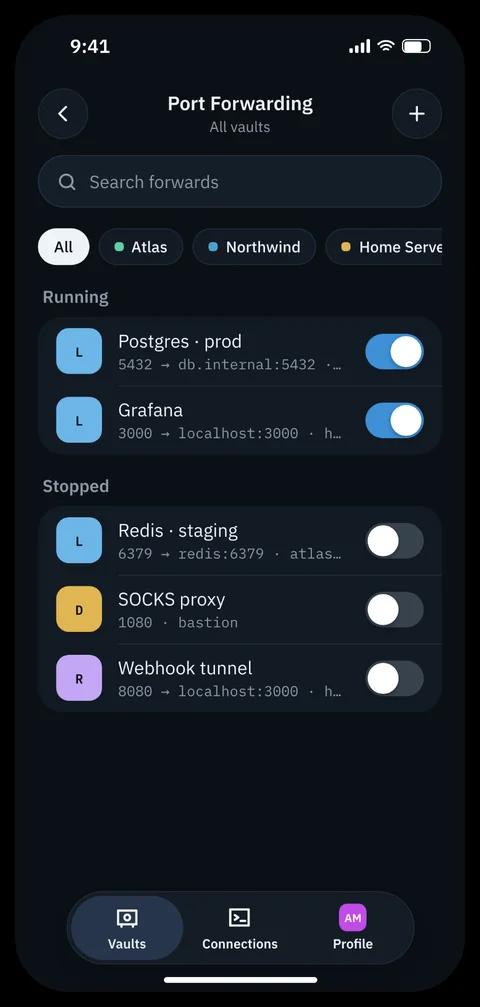
  • The Port Forwarding list in BranchShell on an iPhone with two forwards running and three stopped

    Every tunnel, one switch

    Port forwards to the services behind your servers, and SFTP to their files.

With BranchBay

Your repositories know their servers.

BranchBay is where the code is; BranchShell is where it runs. Linked, the Git client and its tray reach every host, forward and database in your vault, and BranchShell stays out of sight until there is a session to show.

BranchBay's Terminal hosts preferences showing a pairing code while BranchShell asks to allow the link
Pairing: the same code in both apps, allowed from BranchShell.
  1. 1

    Pair once

    Preferences, Integrations, Terminal hosts in BranchBay shows a pairing code; BranchShell shows the same and asks you to allow it. From then on the two talk over a local socket, and either side can unlink. BranchBay sees host names, addresses and forwarding rules. Passwords, keys and what you type stay in BranchShell.

  2. 2

    Shells and forwards in the tray

    Cmd+S switches the BranchBay tray to your whole vault: hosts, port forwards and database connections, filtered by group. Return connects to a host or database or toggles a forward, Tab switches between All, Hosts, Forwards and Databases.

  3. 3

    Only what is running

    The active strip counts open shells, running forwards and connected databases. Cmd+Alt+A narrows the list to them, and Stop all closes every one.

  4. 4

    A shell where you are

    Cmd+T opens the highlighted repository in BranchShell, in a new tab or a new window, in place of the system terminal. BranchShell only comes on screen for a session; a forward runs with nothing to see.

The BranchBay tray in three states: repositories, the Shells and forwards list from the BranchShell vault, and the Active only filter
The tray: repositories, then Cmd+S for shells and forwards, then Cmd+Alt+A for only what is running.
Pricing

One price. Two computers. Yours for good.

No subscription, no seat that expires, no plan to pick. Try it free, then pay once. A separate licence from BranchBay's, at the same price. The phone and tablet apps are sold apart, by their stores.

A $5 a month subscription costs $60 a year and $300 over five. BranchShell is $20 once for two machines.
Free trial 14days, free Starts the first time you open the app.
  • The complete application, nothing held back
  • No account, no card, no email to start
  • Your groups, profiles and settings carry over when you buy
Download the trial
SSH client licenceBranchShell $20once For 2 computers.
  • Two computers, any mix of macOS, Windows and Linux
  • Every feature, unlimited hosts, keys, forwards and databases
  • Updates delivered inside the app
  • Links to BranchBay at no extra cost
Buy BranchShell for $20 Secure checkout. Your key arrives by email and works straight away.
FAQ

Questions, answered.

Do I need BranchBay to use it?
No. BranchShell is a complete SSH client on its own. BranchBay adds the link: your vault's hosts, forwards and databases in the Git client's tray, and a shell in the repository you are looking at.
Where is my data kept?
In an encrypted vault on your computer, unlocked with a password you can keep in the system credential store. Hosts, keys, identities, snippets, forwarding rules, database connections, known hosts and session logs never leave the machine.
Which databases does it talk to?
MySQL, MariaDB, PostgreSQL, SQLite, SQL Server, ClickHouse, Redshift and Turso with the table grid and the query console; Redis, MongoDB, InfluxDB, DynamoDB and CloudWatch as connections; Amazon S3 and Cloudflare R2 as buckets in the SFTP tab. Any of them can connect through an SSH host from the vault.
Can I bring hosts in from my current client?
Yes. BranchShell reads your OpenSSH config and known hosts, fetches servers from AWS, DigitalOcean, Azure and Hetzner Cloud, and imports a Submarine vault whole.
Which platforms?
macOS, Windows and Linux, from one codebase, on the engine BranchBay already runs on all three. The same vault file, shortcuts and themes on each. On a phone or tablet, BranchShell for iPhone, iPad and Android.
Is there an app for my phone?
Yes: BranchShell for iPhone and iPad is in the App Store and BranchShell for Android is on Google Play. They have the terminal, keys, port forwards, SFTP and a console for PostgreSQL, MySQL and SQLite, and take your vaults from the desktop over a QR code. Mosh, S3 and R2 buckets and the link to BranchBay stay on the desktop. The apps are free for 14 days, then $14.99 a year, apart from the desktop licence.
How is it licensed?
A 14-day trial starts on first launch. After it, a licence key bought here or from inside the app unlocks BranchShell for good: $20 once for 2 computers, not a subscription. It is a separate licence from BranchBay's, at the same price. The phone and tablet apps are a yearly subscription in their stores instead.
Is BranchShell a Termius or PuTTY alternative?
Yes. BranchShell is a native SSH client for macOS, Windows and Linux with no account and no subscription on the desktop, and apps for iPhone, iPad and Android. See how it compares with Termius, PuTTY, MobaXterm, SecureCRT, Xshell, Tabby and Prompt .
Is BranchShell a TablePlus or DBeaver alternative?
For the databases behind your servers, yes. Its SQL client has a table grid, a query console and table editing, and reaches a database through an SSH host from the vault without a tunnel to set up. See how it compares with TablePlus, DBeaver, DataGrip, Navicat, Beekeeper Studio, Sequel Ace, HeidiSQL and MySQL Workbench .
Compare

Switching from another SSH or database client?

Which ones bill you every year, which ones run on a Mac and what each does better, side by side. BranchShell on the desktop is a one-time purchase on every page.

Better together

BranchBay is where the code is.

The Git client BranchShell was built beside. Install both, link them once, and every server is one shortcut from its repository.

Download BranchShell on the App StoreGet BranchShell on Google Play

Questions about BranchShell: contact@branchbay.dev